Designing both the conversation and the system behind it
Selected client work / Think CompanyFour Xfinity projects spanning troubleshooting, AI behavior, appointment experiences, and the process that helps teams design with confidence.
01 / Conversation design + experience strategyFrom customer symptoms to a reusable repair framework
I helped define a troubleshooting model and developed 14+ conversation scripts connecting customer language, diagnostic findings, and the next appropriate action.
Scenario grouping, conversation flows, scripts, and behavioral requirements
My contribution
Collaboration
UX Strategy and UI Design
The starting point
Customers had to choose a category before getting help
The earlier entry experience presented lists of questions and asked customers to decide between lists of predetermined symptom categories.
That put the work of interpreting the problem on the customer before troubleshooting could begin.
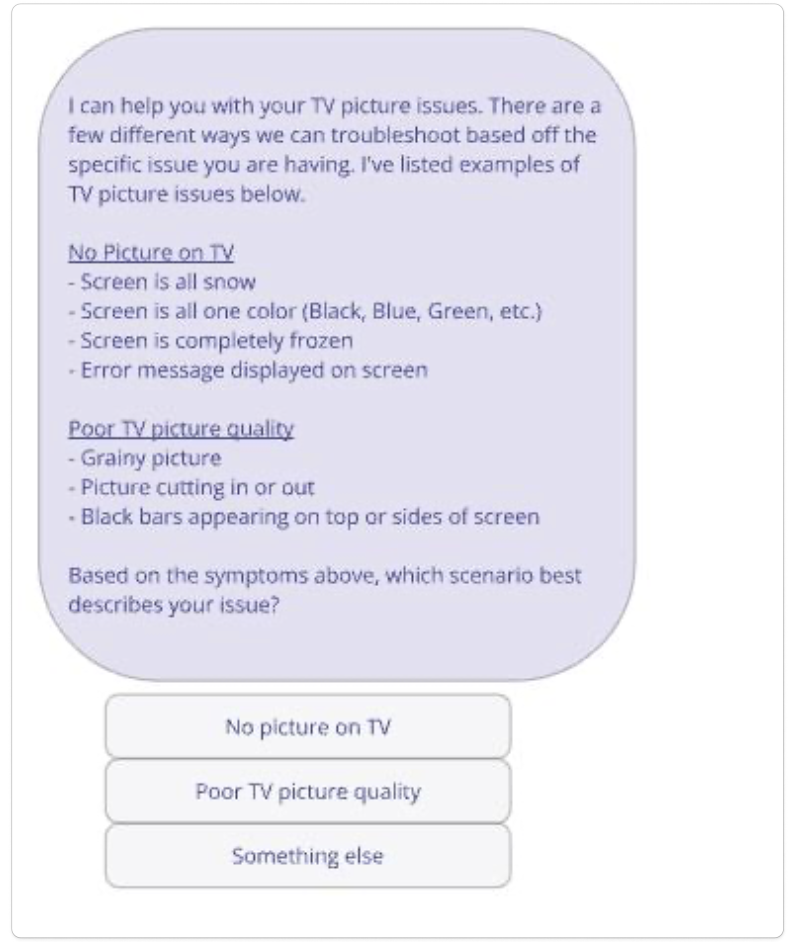
Earlier approach: the customer reads the examples and selects a predefined category.
The design direction
Start with the customer’s description
Customers might describe the same setup problem in different ways. I grouped scenarios by shared logic so the experience could investigate what the customer meant.
A previous replacement box gives useful context before a diagnostic check even runs.
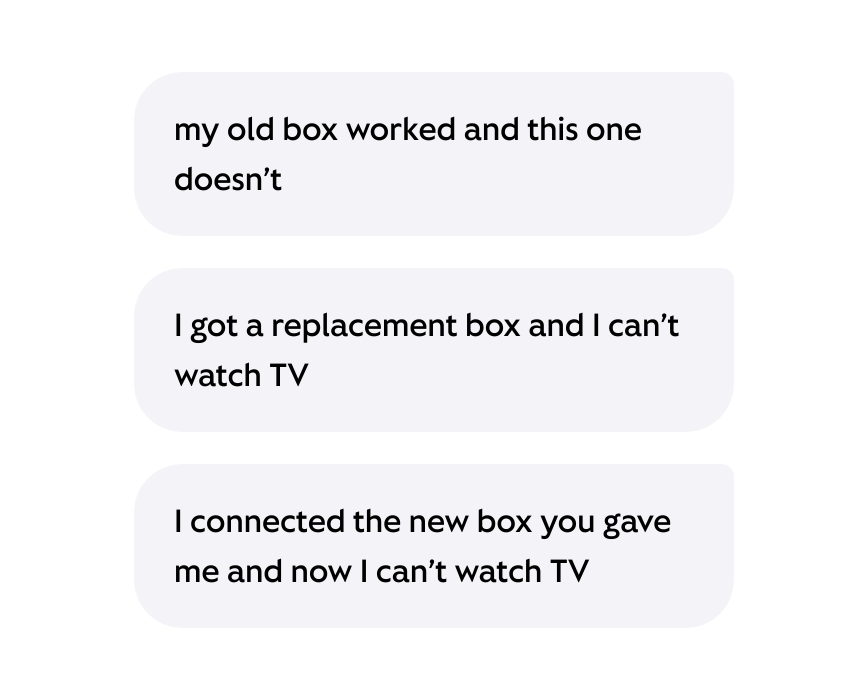
Scenario inputs: different descriptions of a replacement-box issue. These examples establish the context the conversation needs to recognize.
Clarify before checking
Ask the question that determines what to investigate
In this script, the assistant asks what appears on the TV. The customer’s answer—stuck on the Welcome screen—points to a setup issue.
The next response explains why the assistant is running checks and sets expectations while the investigation happens.
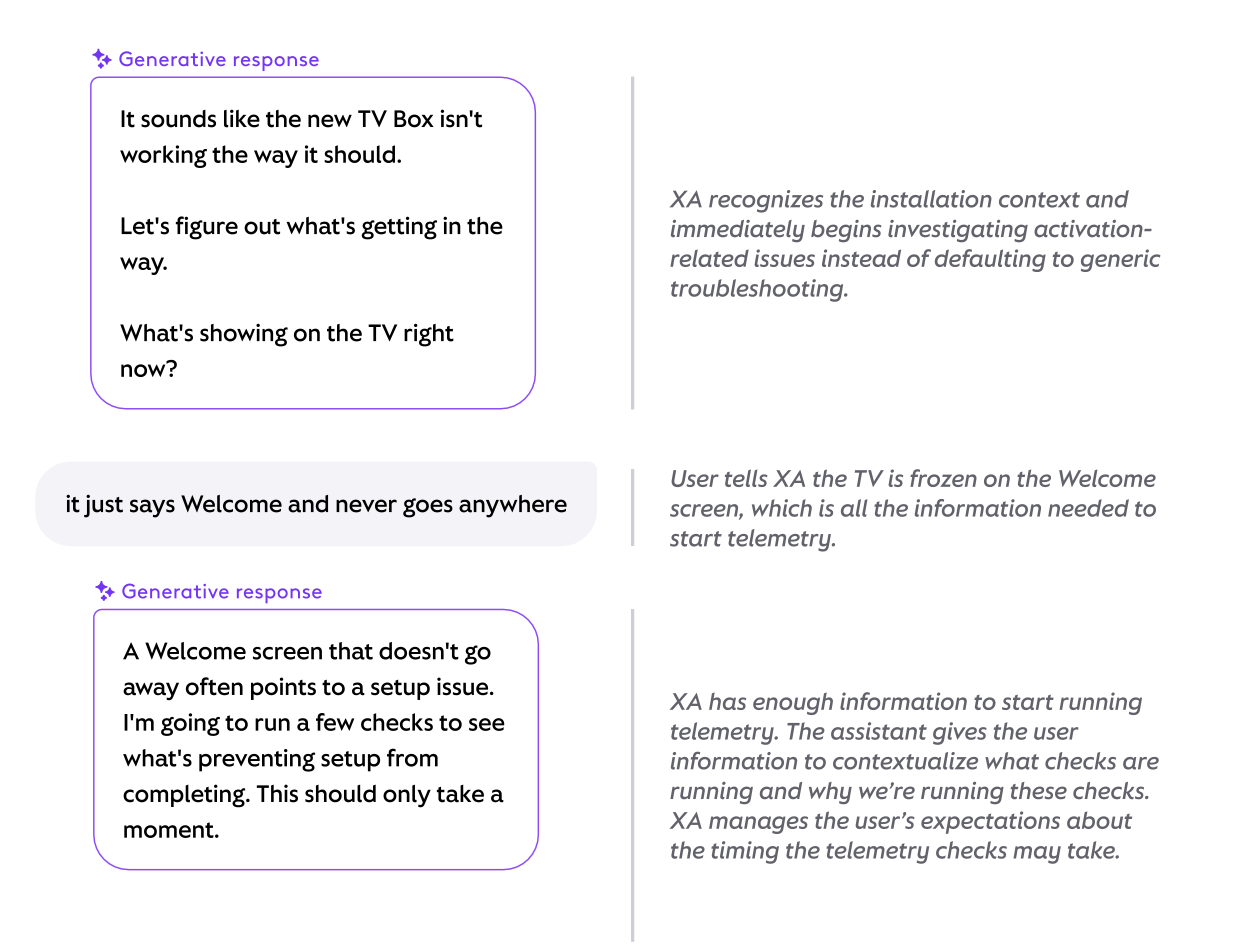
Script excerpt: customer context → targeted question → explanation of the next system check.
Verify the customer’s end goal
A completed repair action isn’t the end of the conversation
The assistant explains that activation is incomplete and offers to finish it. After the customer agrees and the device activates, it checks whether the customer can get back to actually watching TV, not just that the activation completed.
The script connects a system result with a customer-visible outcome.
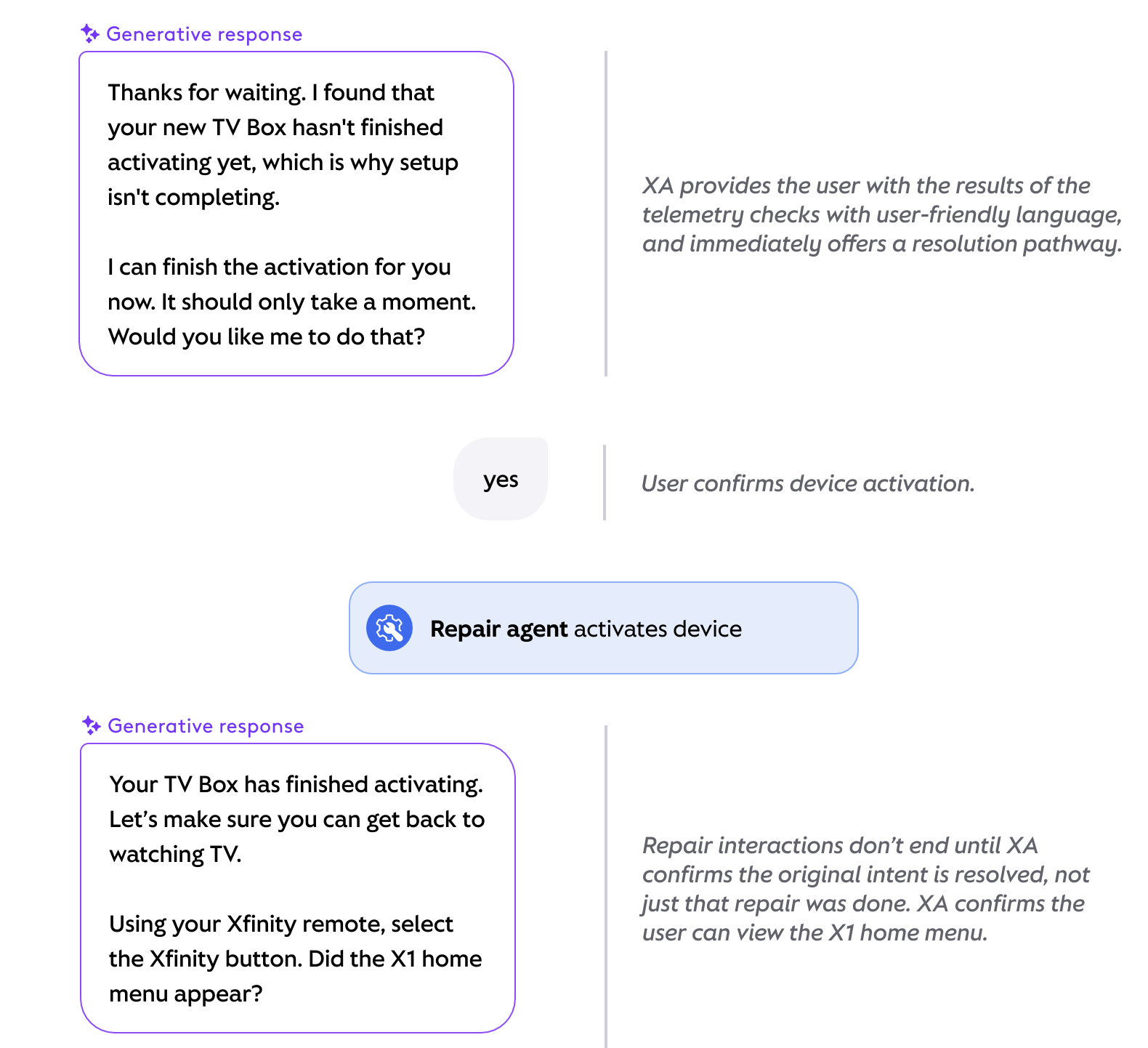
Resolution excerpt: explain the finding → offer activation → confirm the action → verify that the TV works.
From strategy to a working experience
The work produced a reusable repair model, 14+ conversation scripts, and a working prototype connecting conversation logic, behavioral requirements, and edge cases. The prototype gave stakeholders something concrete to evaluate and refine, prompting discussion about customer effort, disambiguation, and troubleshooting behavior.
Feedback on the AI-assisted spec-to-prototype approach highlighted its potential for broader reuse:
“This could be the blueprint for all of our pillars.”
A shared approach to appointment experiences
02 / Content design + service experiencesI proposed a common appointment capability that could support different journeys while preserving the business rules and operational needs of each appointment type.
Experience evaluation, shared concepts and patterns, future-state narratives, and stakeholder facilitation
My contribution
Work produced
A proposal for shared appointment experiences
The opportunity: identify what could be shared
Fragmented scheduling flows meant different interaction patterns and repeated content and design decisions. I evaluated existing experiences to distinguish reusable patterns from appointment-specific requirements.
Appointment discovery and time selection
Confirmation and management
Rescheduling and cancellation
Shared interaction patterns:
Appointment-specific requirements:
Appointment-specific business rules
Location and availability requirements
Preparation and operational workflows
Applying the approach to a store visit
This proposed journey shows the move from a request to time selection and confirmation. “Book appointment” names the action. “Store visit confirmed” makes completion explicit and brings the location, time, and reason for the visit together.
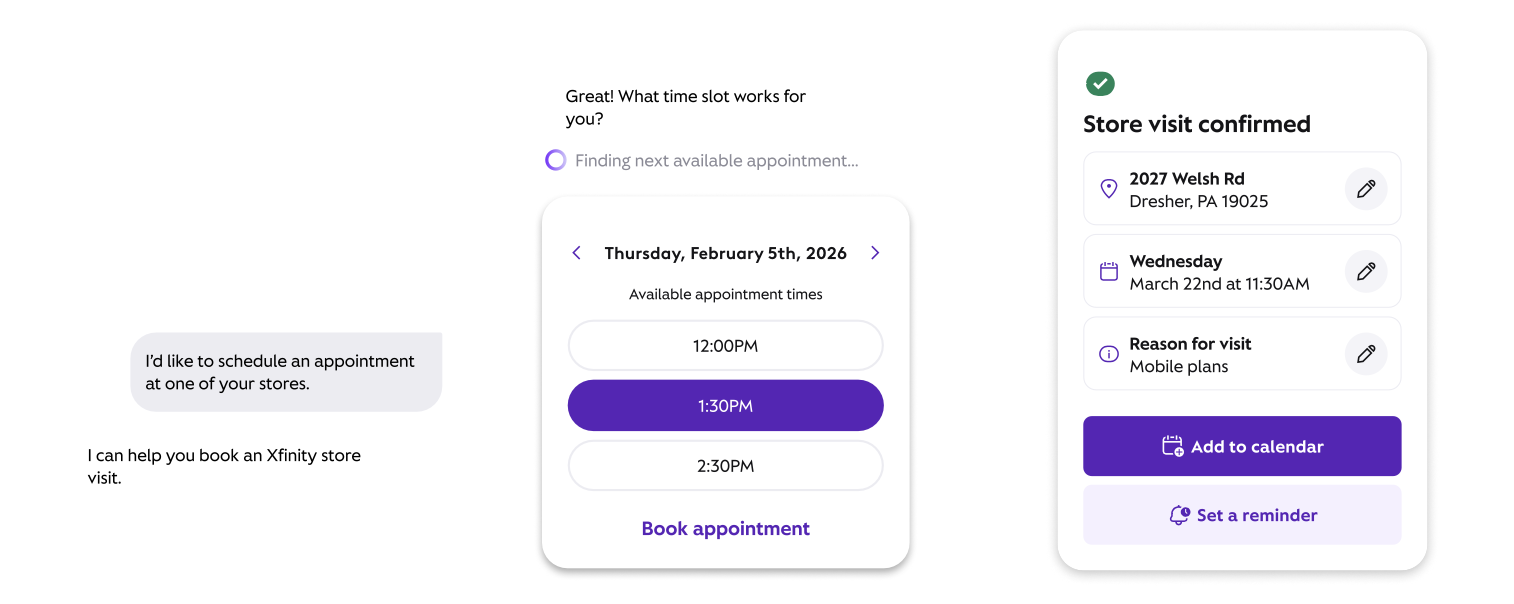
One application of the proposal: request → time selection → confirmation. The example illustrates the interaction and copy; the shared vs. specific framework above describes the broader approach.
What teams adopted
The UX Sales team within XA adopted parts of the appointment flow for experiences they were building and drew on our discovery work. The proposal gave another team a starting point for its own appointment work, demonstrating how shared patterns could extend across journeys.
“This is going to kickstart so many crucial alignment conversations.”
I defined the content hierarchy, copy, and behavioral guidance for “Why this happened,” including how generated explanations should respond to changing system findings.
Defining what an AI assistant can say, and when
03 / AI experience guidanceMy contribution
Content hierarchy, UX copy, generative instructions, and developer spec
Collaboration
UI Design on interaction behavior in Figma
Two connected problems: information hierarchy and response behavior
The response needed a clearer distinction between explanation and action. The spec also needed to define what the assistant could say when system checks passed, failed, conflicted, or couldn’t complete.
Hierarchy before
The explanation and next step competed for attention
The alert summary included the finding, cause, Xfinity response, and customer action. The conversation below then repeated the diagnosis and recommendation.
The customer’s next step was embedded in that explanation.
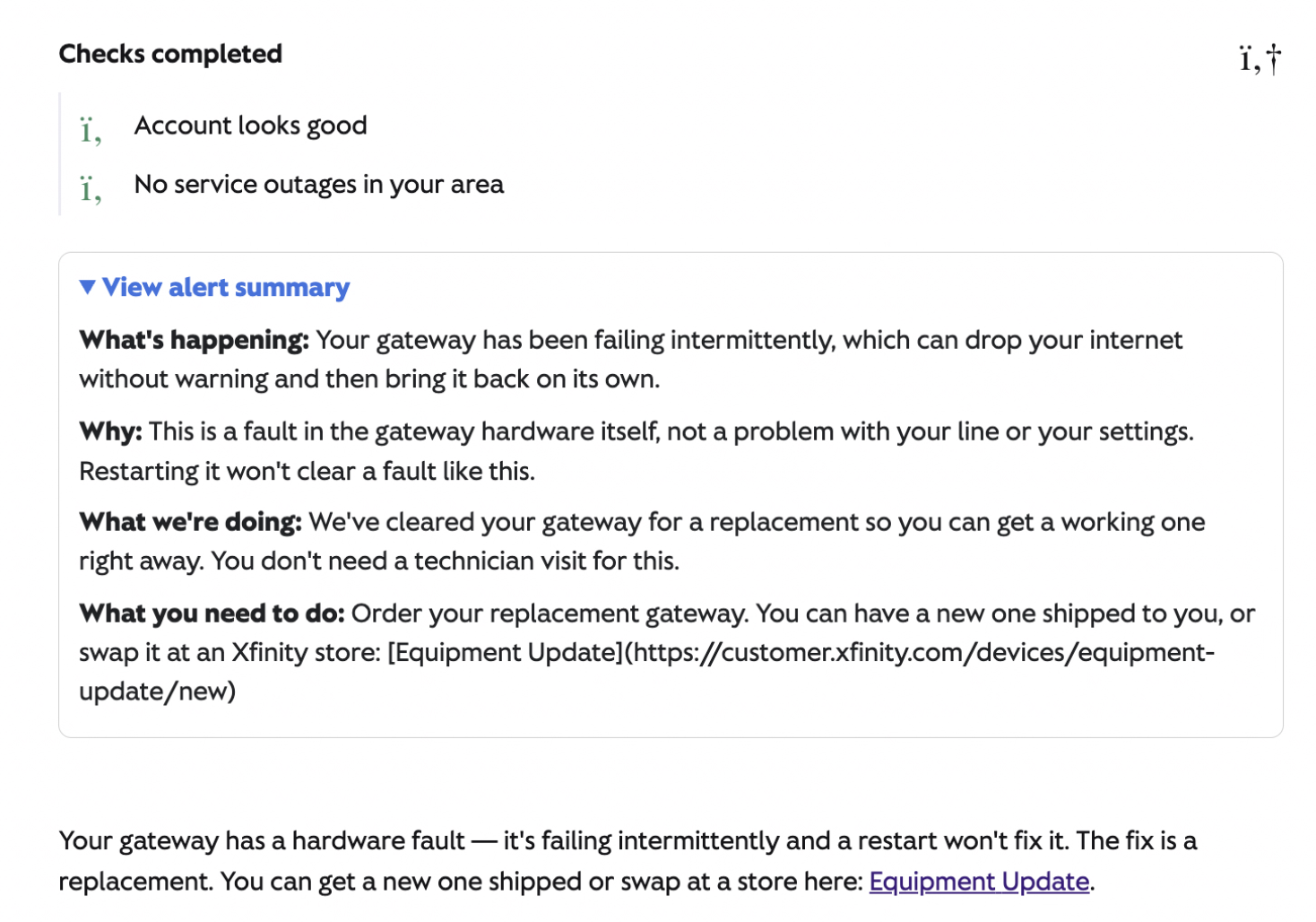
Before: the alert summary and conversation repeat the diagnosis and next steps.
Hierarchy after
Give explanation and action distinct places
I defined “Why this happened” as optional context behind the recommendation. Within the component, “What you need to do” gives the required customer action its own section.
I partnered with UI Design on the interaction behavior and wrote the accompanying spec for development.
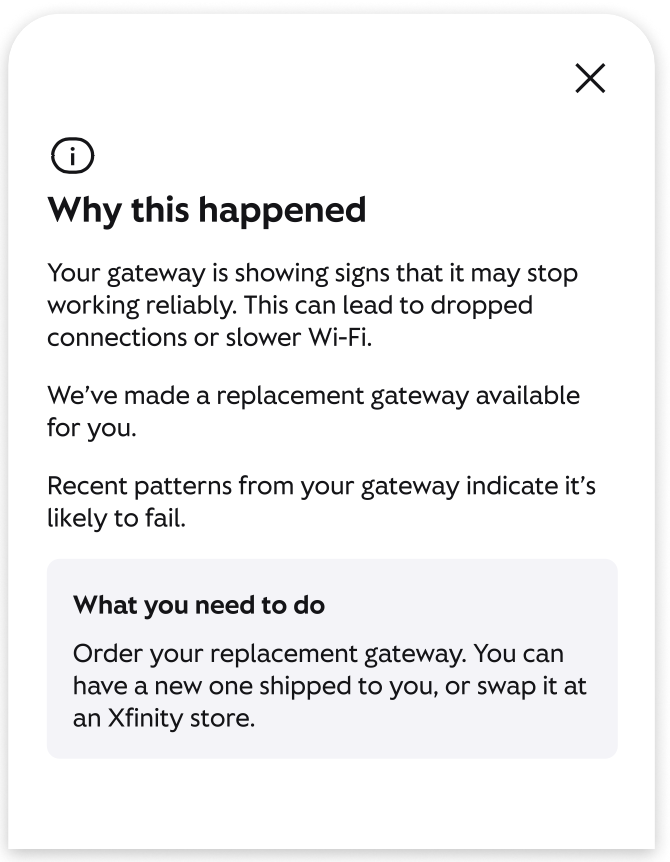
After: the component separates supporting explanation from the customer’s required next step.
Specify the behavior behind the words
The hierarchy defined where information belonged. I also documented rules governing what the generated content could claim across different system outcomes.
Reflect what’s known
Use “can cause” unless the service impact is confirmed. Include a cause only when the evidence supports it; omit it when unknown.
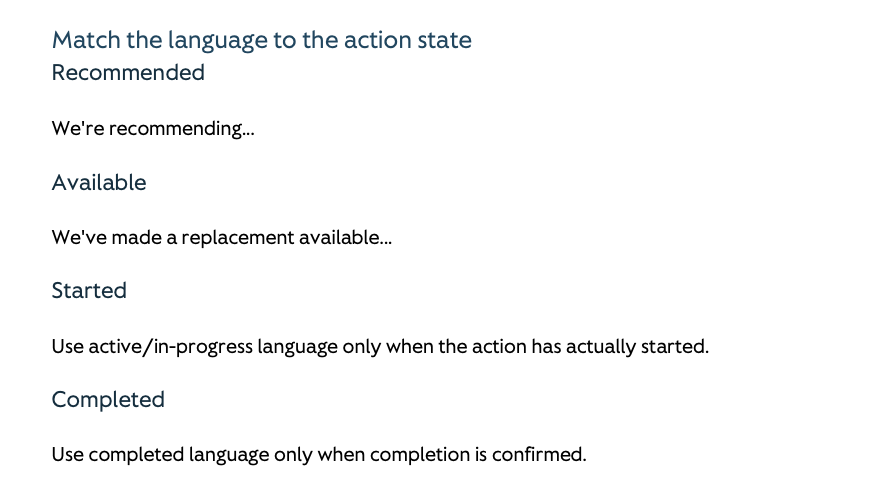
Say what’s actually happened
Developer spec excerpt, page 6
Make the customer’s next step clear
Keep the recommendation in the conversation. Use “Why this happened” for optional context and “What you need to do” for required customer actions.
What the work produced
A Figma design and developer specification covering content and behavior. The guidance model also informed subsequent Repair work, including TV/video specs.
I developed a discovery process that made unresolved questions, parallel exploration, and readiness for design more explicit. The process was implemented across XA UX and used by other pillars starting new work.
Giving teams a clearer starting point for design
04 / Process design + design readinessProcess evaluation, ambiguity mapping, and proposed phases and expectations
My contribution
Refined the model with leadership
Collaboration
The problem started before design
Unresolved questions, late research, and technical dependencies led to redesign as new information emerged. I mapped where ambiguity entered the process and proposed clearer expectations for discovery.
Three changes to the discovery model
Frame the questions
Identify risks, assumptions, and areas needing deeper investigation before broad discussions.
Allow research, technical, and strategic exploration to happen simultaneously.
Explore in parallel
Check readiness
Confirm that teams have enough information to move into design, with clearer expectations for what needs to be resolved first.
Implemented across XA
The updated discovery process was implemented into XA’s UX workflow and shared with new team members and cross-functional partners. Teams in other pillars, including Billing and Collections, used it as they kicked off new projects in Sierra.
The framework moved beyond the original proposal to become a working process for framing questions, coordinating parallel discovery, and determining readiness for design.